The carousel-tools market in 2026 looks nothing like it did in 2022. Two trends collided: AI-first design assistants got actually useful, and the major design tools all built carousel-specific templates because creators kept asking. The result is more options than any single creator needs, and a lot of confused decision-making.
I tested every major option below by building the same 9-slide carousel, a teardown of three viral hooks, in each one. Then compared time-to-finished, design quality, and what each tool wanted me to upgrade for. Here is the honest read on the best carousel maker apps in 2026.
(If you are still on the fence about whether carousels are worth the effort, our breakdown of why carousels keep out-reaching Reels in 2026 covers the data.)
What actually matters in a carousel maker
Five things, weighted by what costs you the most when missing:
- Speed from idea to finished slides. This is the gap that usually kills posting consistency. Tools that get you to slide 1 in under 60 seconds keep you posting.
- Mobile editing that actually works. Most creators draft on phone. If editing on a 6-inch screen feels punishing, you will skip days.
- Brand kit memory. Fonts, colors, layout. The tool should remember them across projects so you are not redoing setup every post.
- Export quality at Instagram's spec. 1080x1350 is the carousel slot. Some tools still export at 1080x1080 by default, which crops your slides.
- AI assistance that is optional, not forced. AI is useful for first drafts of copy. It is not useful when it is nudging you every step or replacing your editorial control.
Things that do not matter much: number of templates (you will use 3), team collaboration features (you are solo for the first 18 months), advanced animation (Instagram strips most of it).
The shortlist at a glance
| Tool | Best for | AI assist | Mobile | Price |
|---|---|---|---|---|
| Canva | All-purpose, fastest start | Magic Write, Magic Design | Solid | Free / $13 mo Pro |
| Figma | Designers wanting full control | Limited | Weak | Free / $15 mo Pro |
| Adobe Express | Brand consistency at scale | Firefly built-in | Solid | Free / $10 mo Pro |
| Reframe | Voice-to-carousel speed run | Native, voice-first | Native iOS | Free trial / $9.99 mo |
| Visme | Data-heavy carousels with charts | Limited | Weak | Free / $29 mo |
| Genially | Interactive presentations | None | Weak | Free / $19 mo |
Canva: the default, for good reason
Strengths: fastest from blank page to finished design. Carousel-specific templates that already split content across 10 slides at the right ratio. Magic Resize means you can repurpose to LinkedIn or Twitter in one click.
Weaknesses: every template is over-designed and over-used. You will spend more time stripping decoration than adding it. Magic Write copy is mediocre, fine for placeholder, not for finishing. The free tier hides 60% of useful elements behind Pro.
Verdict: use it if you do not already have a strong design system and you need to ship now. The Pro tier is worth it within 30 days if you post 2x per week.
Figma: for creators who want pixel control
Strengths: total control. A proper component system means your slide-1 hook block, your slide-end CTA, and your watermark live as reusable components. Change once, update everywhere. The plugin ecosystem (Pitchdeckr, Figma to Instagram, Auto Carousel) handles export.
Weaknesses: steep learning curve. The native template selection for carousels is bare. Mobile editing is nominally supported but in practice unusable.
Verdict: if you are already a Figma user, skip Canva. Make a carousel kit once and never look back. If you are not, the 4-hour learning curve is not worth it for solo content posting.
Adobe Express: Adobe's hidden gem
Strengths: Adobe Firefly is the strongest in-tool generative AI for image fills and backgrounds in 2026. Brand kit syncs across desktop and mobile cleanly. Templates are noticeably more "designer-touched" than Canva's.
Weaknesses: smaller community means fewer tutorials. Some Photoshop muscle memory transfers, most does not. Subscription bundling with full Creative Cloud is overkill if you only need carousels.
Verdict: best Canva alternative for designers who already pay for Creative Cloud. Standalone, it is a fine middle ground that nobody talks about enough.
Reframe: the voice-to-carousel approach
Full disclosure: this is our app. So treat the next paragraph with the appropriate skepticism.
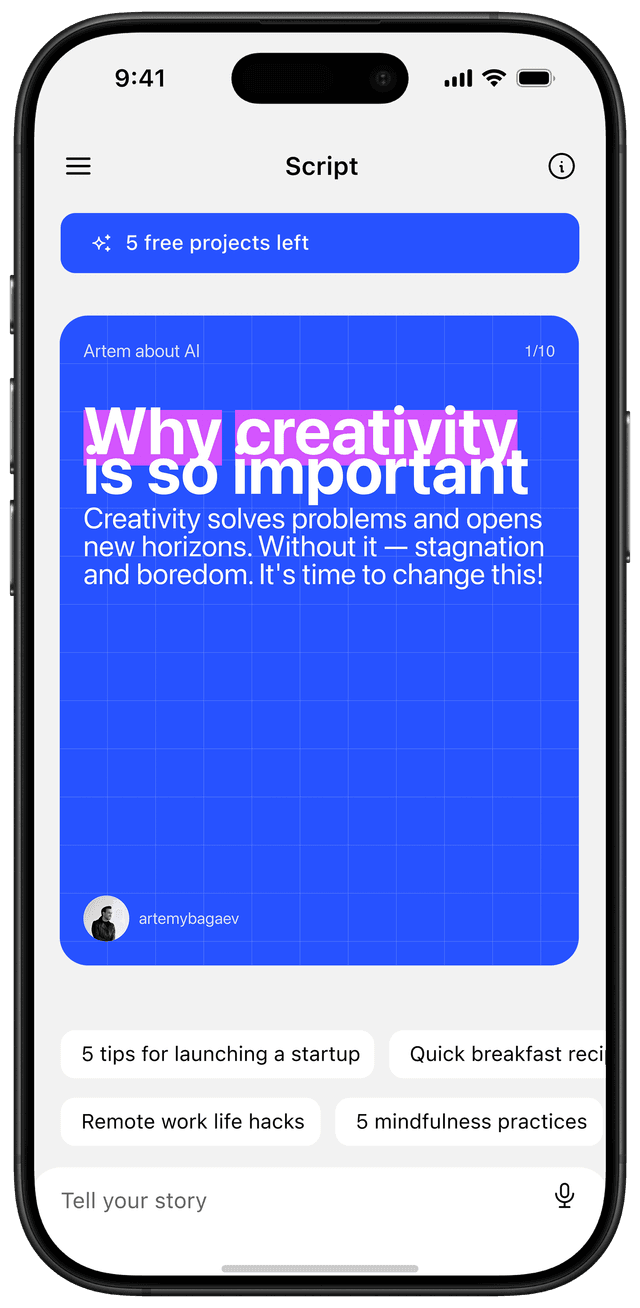
Reframe takes a 30-second voice note ("here is the idea I want to post about") and produces a designed 5-10 slide carousel. The hook is auto-extracted, the script is generated, and the slides come out designed in your brand kit. You edit the copy via chat in the same app and export.
Strengths: it is the fastest path from "I want to post about X" to "I am exporting slide 8" of any tool I have used. Roughly 3 minutes for a finished carousel from a clean voice note. Native iOS app means you draft on the phone where you also have the idea.
Weaknesses: design control is intentionally limited. You cannot move individual elements pixel-by-pixel. If you want a custom one-off layout, you are better off in Figma. Currently iOS-only. Android and web are on the roadmap, not shipping yet.
Verdict: best for creators who post 3+ times per week and care more about throughput than custom design. If your bottleneck is "writing the script and laying it out," this removes both. Try Reframe on the App Store.
Visme: when carousels need data
Strengths: best chart, infographic, and data-viz tooling among carousel-capable tools. Excel or CSV import to polished slide chart in two clicks.
Weaknesses: heavy interface, slow for simple posts. Pricing tier jumps are steep.
Verdict: niche pick. If you are a data analyst, market researcher, or B2B SaaS posting numbers regularly, Visme pays back. Otherwise overkill.
Genially: interactive content people forget about
Strengths: lets you build interactive elements (clickable slides, hidden reveals) that work as exports too. Useful for educational creators who want quiz-like or branching slide content.
Weaknesses: most interactivity gets stripped on export to Instagram (which is static anyway). The free tier limits projects too aggressively.
Verdict: skip unless you specifically need interactive embeds for newsletters or websites in addition to carousels.
Honorable mentions
- Hootsuite Composer / Buffer's carousel previewer. Not for designing, but useful for reviewing carousels before posting.
- Threads native composer. If you post on Threads, the in-app composer now handles carousel text-cards reasonably well.
- AI-only tools (Tweet Hunter, Tribescaler). Generate copy quickly but pair them with a real design tool for slides.
Picking by use case
- Posting 1-2x per week, want to look polished: Canva Pro.
- Posting 3+x per week, care about speed: Reframe.
- Already a designer with a Figma habit: Figma + Auto Carousel plugin.
- Adobe Creative Cloud subscriber: Adobe Express.
- Data-heavy B2B content: Visme.
- Need interactive elements outside Instagram too: Genially.
What I would actually do in 2026
If I were starting today and wanted to post 3 carousels a week without burning out:
- Use Reframe for the daily and quick posts. Voice note to designed slides to ship.
- Use Canva Pro for the once-a-month "deep guide" posts that deserve handcrafting.
- Skip everything else until you have posted 50 carousels and know what your bottleneck actually is.
The mistake I see most often is creators picking Figma because it is "the professional choice" and then shipping nothing for two weeks because they are customizing components. Pick the tool that matches your throughput, not the one that flatters your design ego.
What to do this week
- Pick one tool from the shortlist that matches your use case.
- Build a 3-slide brand kit (hook layout, body layout, CTA layout) and save it.
- Write or record one piece of content. Run it through the kit.
- Ship it within 24 hours of starting.
- Note where you got stuck. That is your real bottleneck.
If the design step is what kills your posting cadence, our breakdown of how to design carousels that go viral covers the slide-by-slide rules. If the writing step is the problem, the voice-note workflow in Reframe was built specifically to fix that.
The best carousel maker app in 2026 is the one you will actually open before you lose the motivation to post.
Frequently asked questions
What's the easiest carousel maker for beginners?
Canva is the easiest start. Templates are pre-split into the right ratio for Instagram carousels, the mobile editor works, and the free tier covers most of what a beginner needs in the first month.
Is Canva enough for Instagram carousels?
For most solo creators posting 1-2x per week, yes. Canva Pro becomes worth it when you find yourself using brand kits and Magic Resize repeatedly. Skip the upgrade until you have posted at least 10 carousels.
What's the best free AI carousel tool?
aiCarousels.com and PostNitro both have generous free tiers and AI generation built in. For voice-driven content, Reframe offers a free trial that produces designed slides from a 30-second voice note.
How long does it take to make a carousel?
With a brand kit set up, a polished 8-10 slide carousel takes 30-45 minutes in Canva or Figma. With voice-first tools like Reframe, the same carousel ships in 3-5 minutes from idea to export.